
One remote for the whole room
I’ve wanted one remote for the whole room since school. On Windows 98 I soldered an infrared receiver to a COM port and got WinLIRC to read my TV remote. I could see every button I pressed, but I couldn’t do much with it: the computer offered few ways to act on a command, and there was nobody to write the glue. More than twenty years later the shops still don’t sell what I had in mind. Logitech stopped making Harmony remotes in 2021, and the rest are huge, ugly and covered in buttons.
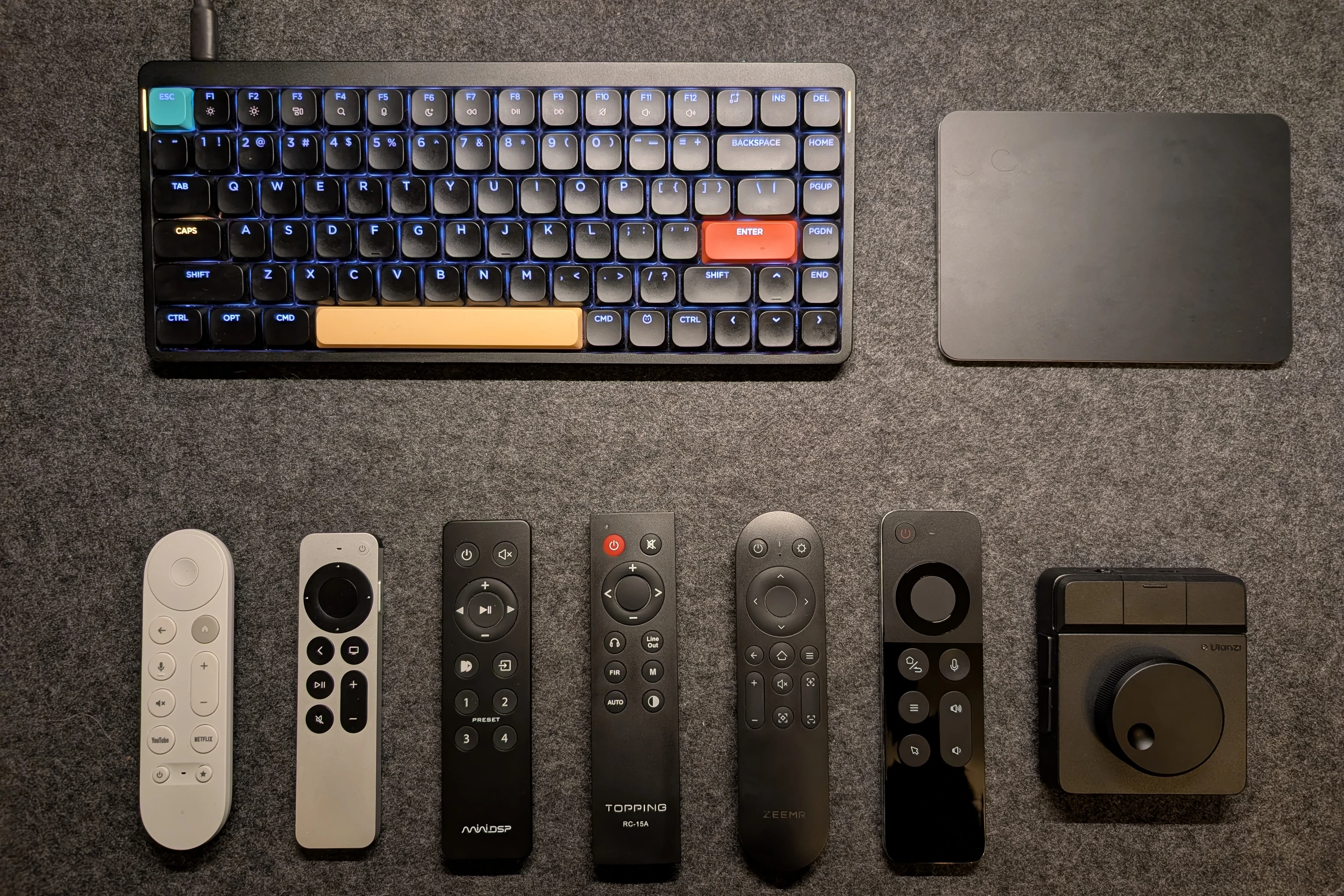
The remotes in this story, photographed for this page.
By this summer my MacBook was already a device in Home Assistant, held together by mac2mqtt, BetterTouchTool and BetterDisplay scripts. In May I described the setup to Codex as “brutal crutches”, and in June it simply stopped working. In July I started replacing it with something of my own, built by AI agents. Everything in that first commit has since been replaced by native code.
It started with a volume knob
On Monday 27 July a Ulanzi Dial arrived: a palm-sized knob with three buttons, meant for the volume, the chandelier and the display. The first problem showed up within minutes: macOS queued a series of “volume up” events and played them back with lag. Thirty-nine minutes later the project had its first commit.
The rest of that night went to one sound. A real volume knob tells you the level by how loud its click is, and I wanted that. At one point the agent reported a 382 ms sample. “That’s long for such a short sound. Are you sure about that length?” A minute later I guessed: “Maybe it’s 38 ms.” It was. The file ran for 382 ms, but the click itself ended at 38, and the rest was silence the agent had been waiting out.
Then the part I’d come for: an on-screen indicator, a HUD, like BetterDisplay’s glass one. My first verdict was “Very doll-like. Not Liquid Glass.” A day later, after a redesign: “Yours is very far off now. It was better before these reworks.”
The HUD’s first two days, rebuilt from each commit’s code.
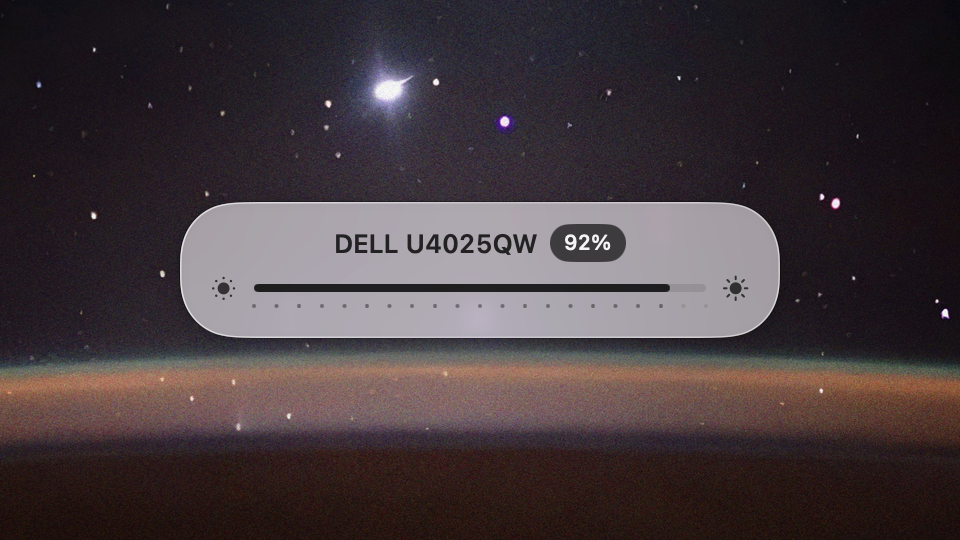
29 Jul, 00:43The first HUD. “Very doll-like. Not Liquid Glass.”
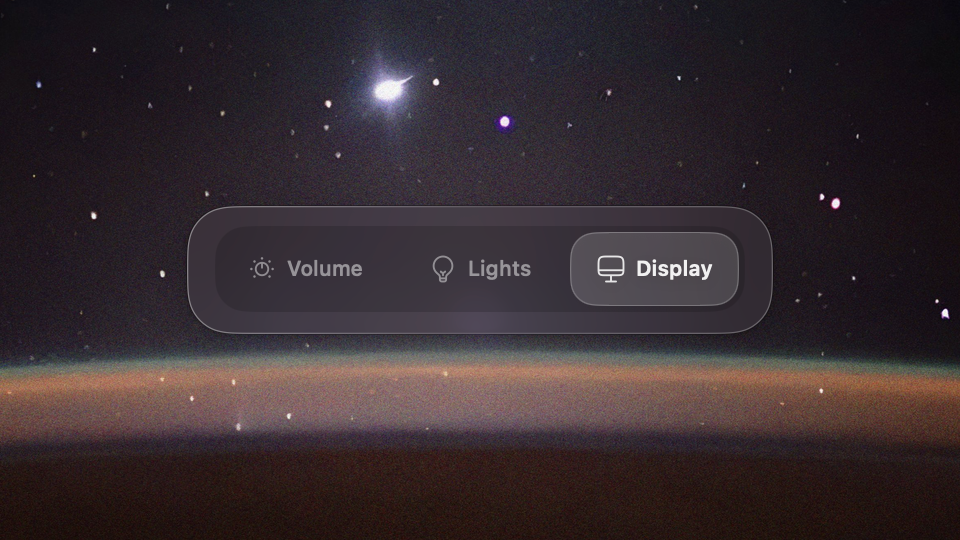
29 Jul, 17:04Apple's segmented control, one tab per Dial profile.
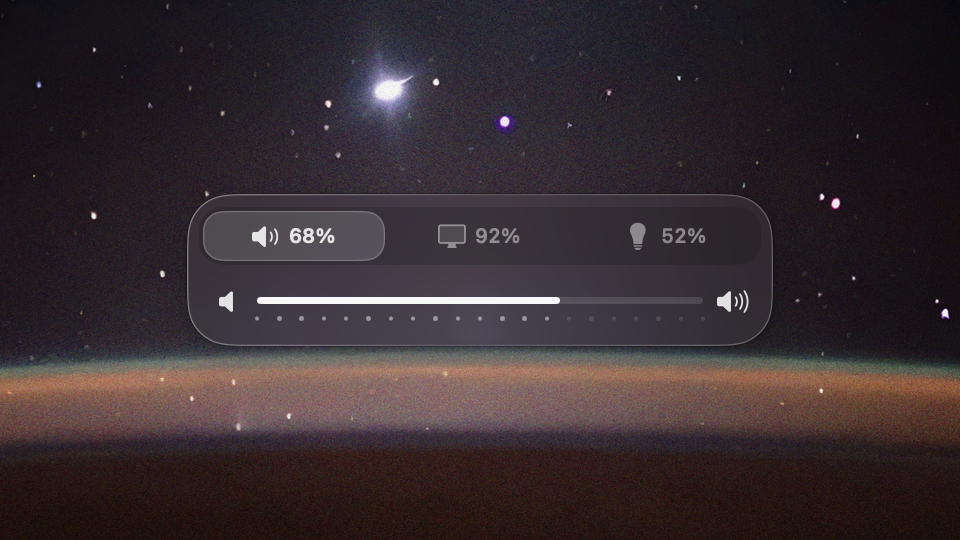
29 Jul, 18:34Custom tabs that show every level at once.
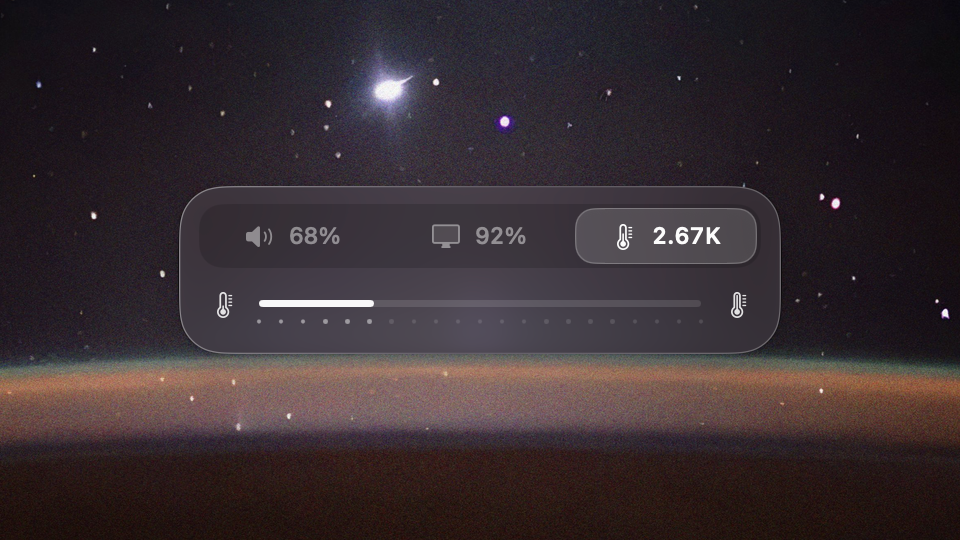
30 JulThe chandelier's colour temperature on the Dial.
When the HUD’s scale fell behind fast turns and the agent couldn’t see why, we split the job in a way that stuck for the whole project:
I’ll turn, you debug. I’ll do a screen recording, and you’ll hear the real wheel’s clicks on it.
My hands and ears on the hardware, the agent on the logs. The same week the keyboard joined in. I flashed my NuPhy with my own fork of a community firmware, calibrated its white by eye against the MacBook’s, and made Caps Lock and the side lights show the input language in colour: white for English, orange for Russian, turquoise for Ukrainian. On 31 July I asked: “So is it an app now, or not?” It was, just about: a HUD with three tabs and a keyboard that knew which language I was typing in. Then I left it alone for six weeks.
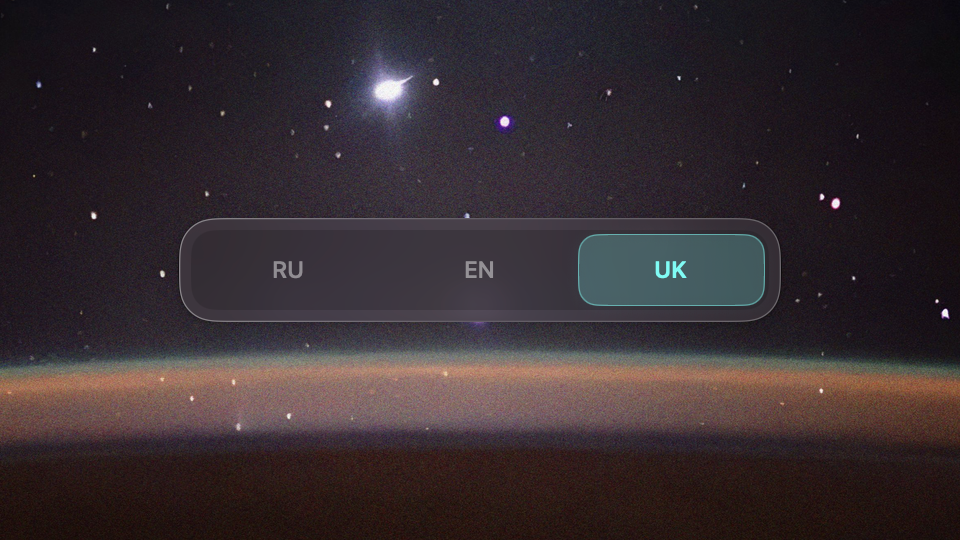
The language HUD, Ukrainian in turquoise.
Built on what I already had
When I came back in September, I didn’t start from what a remote app needs. I started from what I already had: my design system Sid-Kit, my table engine Data Grid, and a long-standing wish to have a flow builder of my own. Straylight was where all three could be pushed at once. It’s how I approach most of what I do: look at the tools around me, and at where the effort on one project can move several others forward.
The brief grew on 21 September, when I picked up an Air Mouse that had been lying around:
There are a number of apps I want to be able to launch from the remote. I see it as a kind of media-centre module, a HUD.
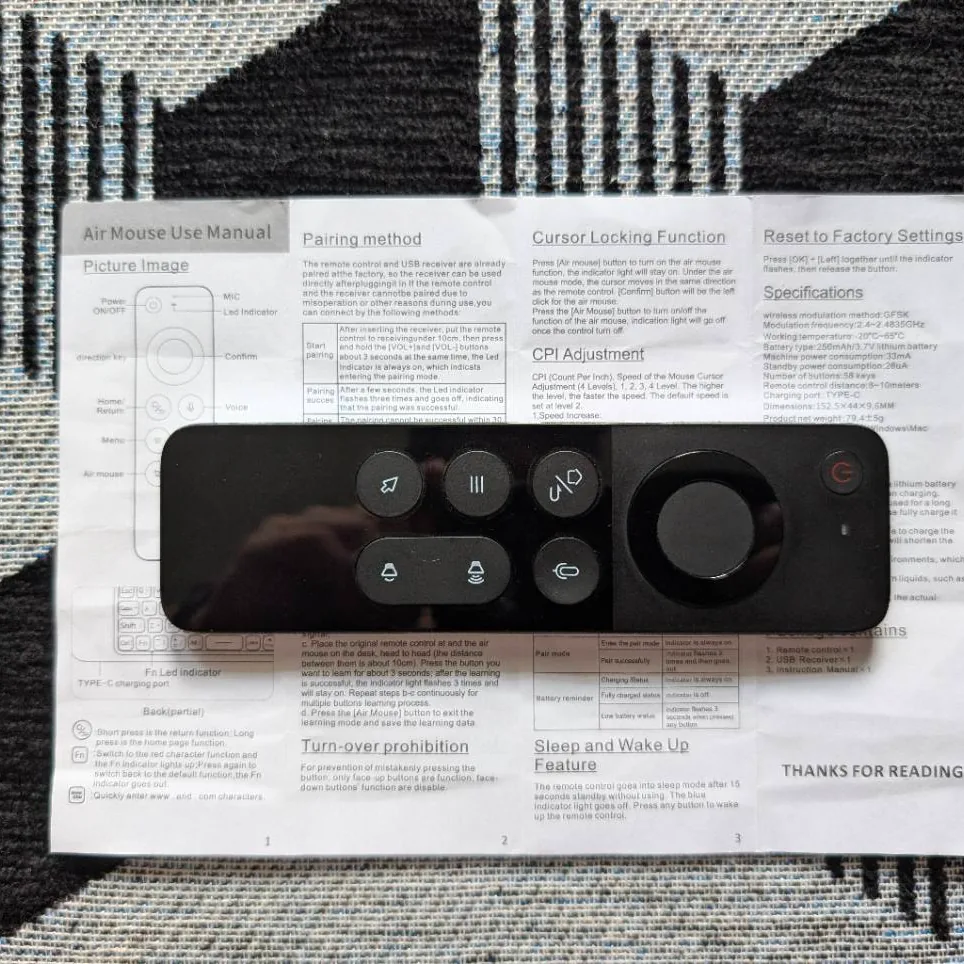
The Air Mouse, the first Straylight remote.
The same message brought in the DAC, the audio processor, the projector and an infrared blaster. One detail shaped the whole interface: when I watch the projector, my monitor and laptop are folded away. So the on-screen menu, the Launcher, had to work without a screen in front of me, with clicks, optional speech and pulses of keyboard light.
The settings window became an Electron app the same day. The agent’s research leaned towards Tauri or native shells, without having built or benchmarked anything. I picked Electron because it let me build the editor in React on Sid-Kit. And instead of the smallest way to reorder a list of action cards, which is what the research recommended, I asked for a real flow builder:
Let it be a bit of overkill for the task at hand. I want us to gain experience with flow builders like this.
Two prototypes from 21 September. The graph won.
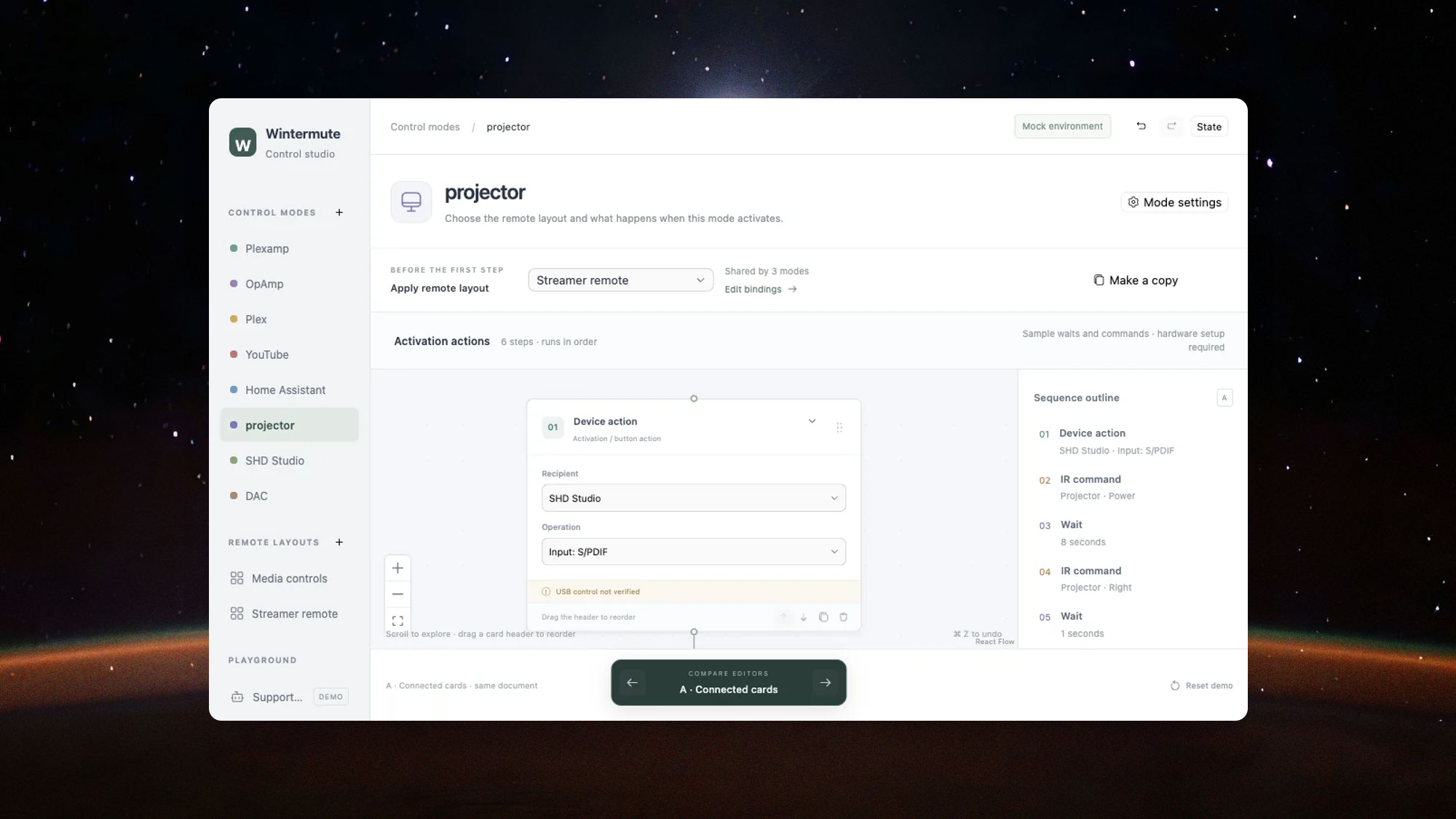
A. Connected cards
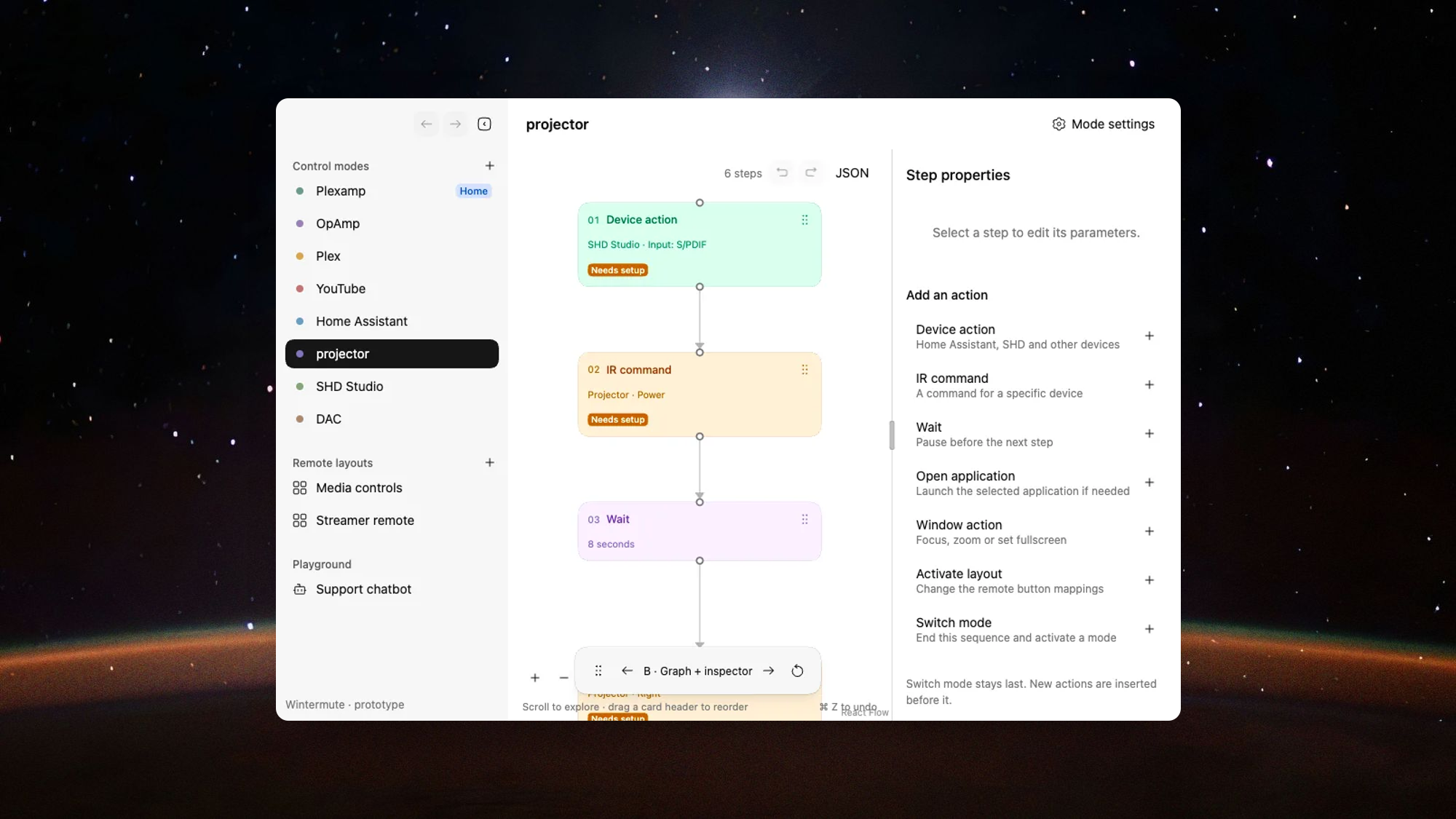
B. Graph and inspector
Forcing my own tools into a new kind of app paid off for all of them. Sid-Kit went from 0.23 to 0.35 while Straylight was built, and the editor exposed limits it hadn’t met before: controls now inherit their card’s intent, and since 0.33 every field sits one step above the card it lies on, in the card’s hue. Data Grid got a consumer far from product catalogs: the States page is one table of every value on every computer. Since 21 October one guided script releases Sid-Kit, Data Grid and Straylight together.
The flow builder is close to becoming a library of its own. Before settling on React Flow, the agent read the source of Dify, Flowise, Langflow, n8n and Coze. A card takes its colour from its name, and every control inside inherits it, so a scenario reads as a set of coloured blocks and nobody picks a colour by hand. Connectors route around the cards in a Web Worker running libavoid, re-route live as you drag and cross only where they must. Cards that can be dragged wobble gently instead of explaining themselves in a tooltip: “the metaphor is the hint: you can drag me.” The wobble layers four motions whose periods never line up, and it stops when the system asks for reduced motion.
Under the hoodThe flow editor
- Colour from a name. In Sid-Kit a card takes
intent={{ key }}. The key is hashed and multiplied by the golden angle, 137.508°, so names that differ by a letter land far apart on the OKLCH colour wheel. Controls default tointent="inherit"and pick up the card’s hue. - Connectors. Routing runs in a Web Worker with libavoid; Tidy up lays the graph out with ELK. Insertion points react within 48 screen pixels at any zoom, connections snap at 28.
- Speed. Dragging one card in a 25-card scenario re-rendered every card 148 times. After the fix, the 95th-percentile drag frame went from 116.7 to 16.8 ms (headless Chrome, development React, 1440 × 1000). In October an idle canvas stopped animating its dashes after two seconds; before, an open editor kept the GPU at about 40% doing nothing.
- Launcher tiles. A tile’s tint comes from the OKLCH hue of the saturated pixels in its app icon.
- Phone. The same editor runs in a phone browser, served by the background agent over its own HTTPS with a one-time sign-in code.
Everything is a scenario
Every input on every remote ends in the same kind of scenario, and each special case that looked different turned out not to be. At first every feature brought its own little model, and a global “control mode” decided three things at once: what was running, what the buttons did and what the menu showed. On 23 September the mode was taken apart. Then, one by one, everything else turned out to be a scenario too:
The Launcher basically presses some button. It’s just that the button is a kind of widget in the Launcher.
Remote buttons got scenarios of their own, and a short press and a hold became two inputs: “If I press it once, I want +5%. If I hold it, +1% on repeat.” Launcher items became scenarios, and the Launcher’s own remote layout stopped being special: “Let’s make the Launcher layout an ordinary layout. ‘Set as launcher layout’ and that’s it.”
- InputA press, a hold, a swipe or a ring turn on any remote
- LayoutThe remote’s active layout picks the binding
- ScenarioThe binding’s own flow of actions, with branches
- ActionsStates, volume, displays, apps, Home Assistant, other Hosts
- Feedback
A HUD, a click on the right output, speech, a key lighting up
The editor only changes drafts. Apply hands them to the Host, which keeps running when every window is closed.
The code went through the same tidying. Close to midnight on 24 September I asked: “Is it normal that we have such an enormous file? I thought the module boundaries were already clear.” The agent’s own status line had mentioned a Swift file of about 4,700 lines. By the next afternoon, after 175 commits, it was down to 389, and a check in the build now fails any file that grows past its limit. I know where each boundary runs: rules that make sense everywhere belong in a shared core that could also run on Linux, and things that only make sense on one system stay native.
The Siri Remote talks to Linux
macOS can’t read the touch surface of Apple’s own Siri Remote, so the remote talks to a Linux machine instead, and that workaround later became the architecture. I’d asked about it at 02:44 on 23 September: the latest Siri Remote is inexpensive, solid and pleasant to hold, and its clickpad can work as a touchpad. On macOS, the touch surface needs a private framework, and the hardened runtime kills the process as soon as the touch callback runs. The Power button can’t be intercepted at all.
So the remote pairs with a small Linux VM on my home server, through its own Bluetooth adapter. On 4 October I wrote: “I bought a BT adapter and plugged it into the mini. And I bought the remote too. What next?” When the agent answered with a list of Home Assistant settings for me to click through, I sent it back: it had access to Home Assistant and the server, so it could do that itself. By evening the remote worked, and I started finding where the model had cut corners:
We’ve got a completely different remote, with a completely different transport and different buttons. But we keep pretending we have one remote.
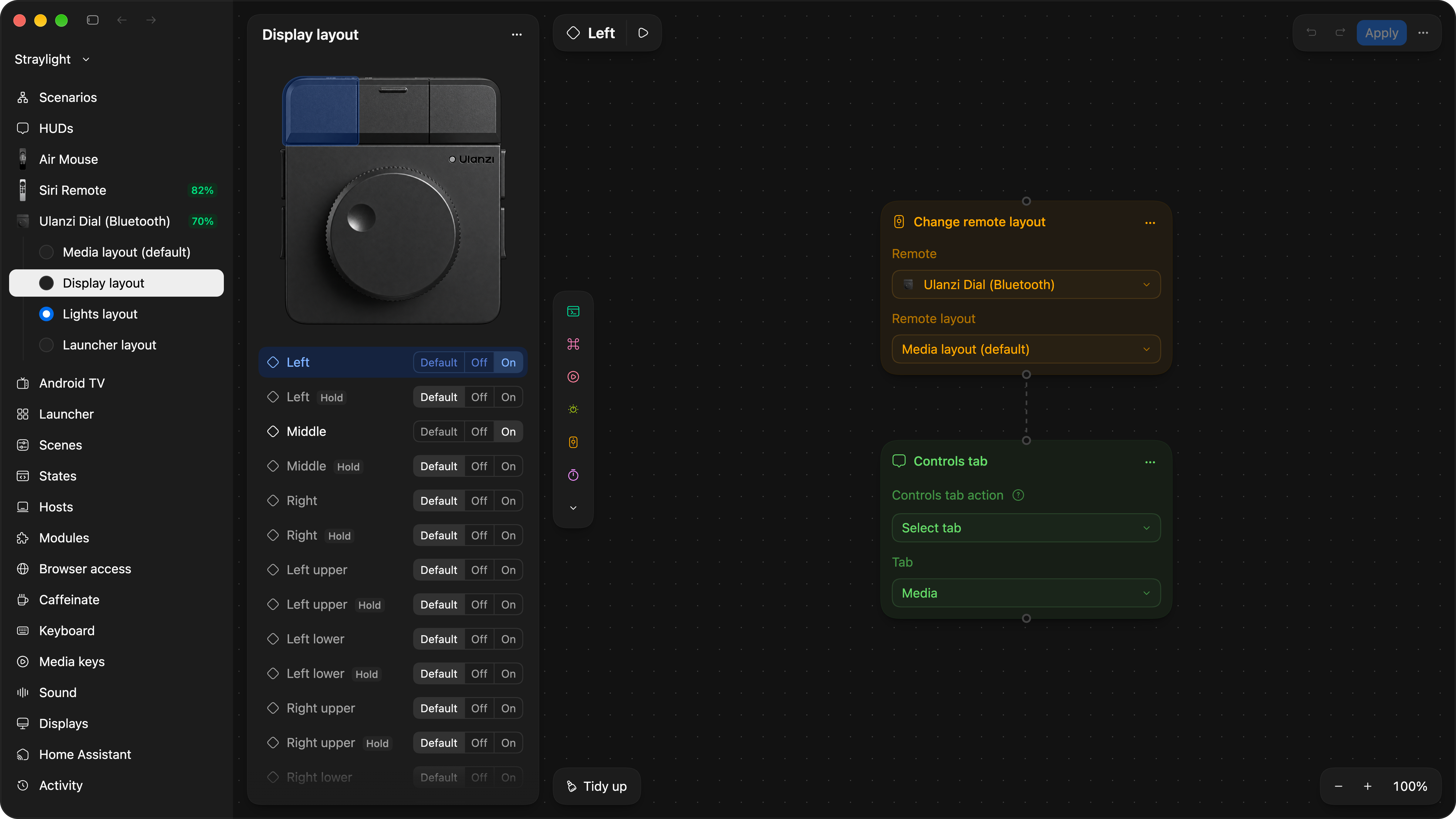
Layouts became the property of each remote. A newly found device waits until you choose to use it, because that’s “a deliberate user action”. When a press seemed to do nothing (“it looks like set dressing”), each remote got its own page showing every link in its path and a live line with the last press. In the editor each remote is a picture with clickable controls at its real size; I measured them with a ruler, and when a hotspot sat slightly off, my note was: “Look at these ridges, the notches.” And once the remote could move the pointer, its input left Home Assistant’s MQTT broker, where any login can do anything in plain text, for its own encrypted channel: “this thing controls input: it can type and control everything that happens on the screen.”
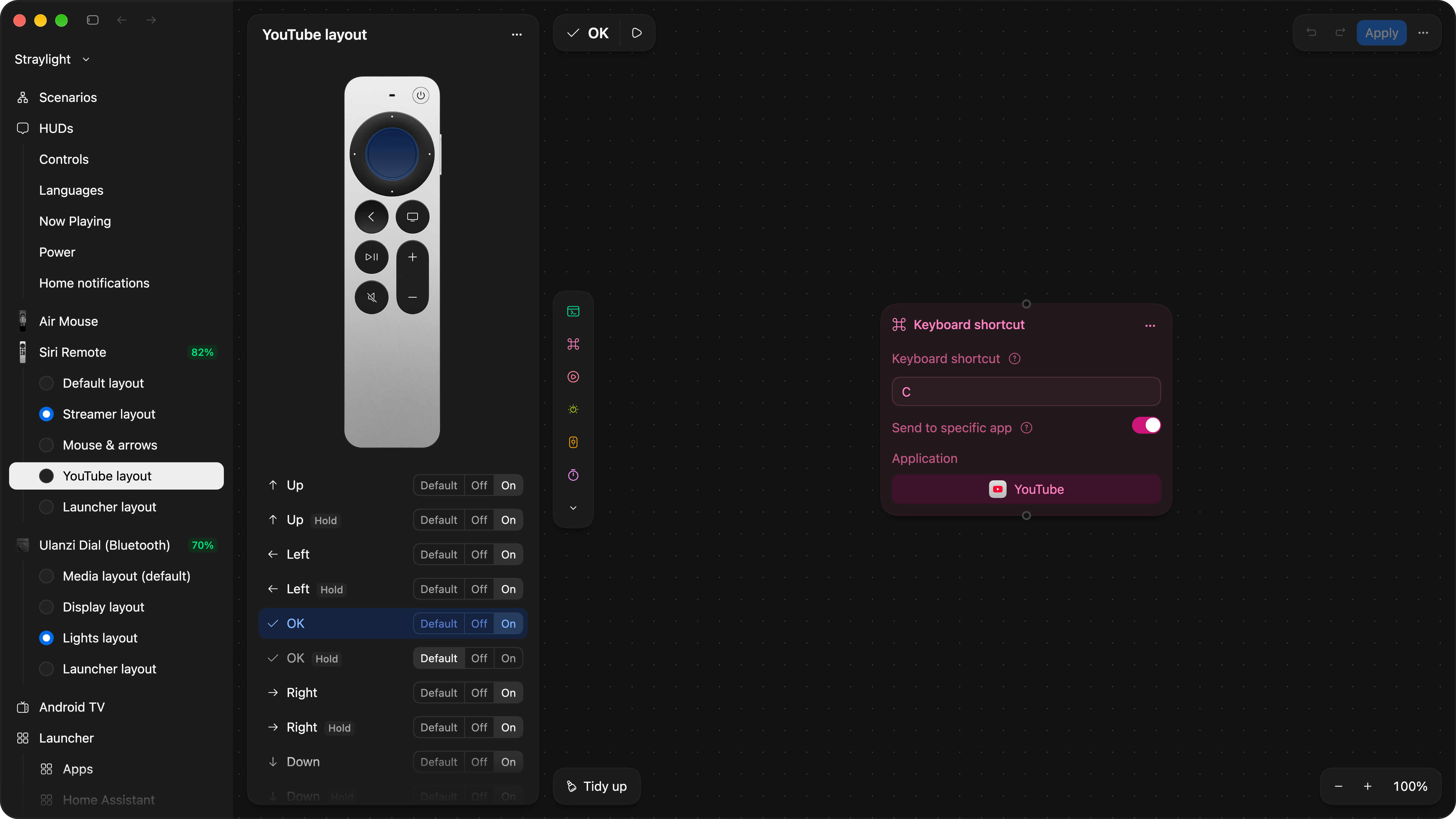
The Siri Remote’s YouTube layout. Remote photo by Apple.
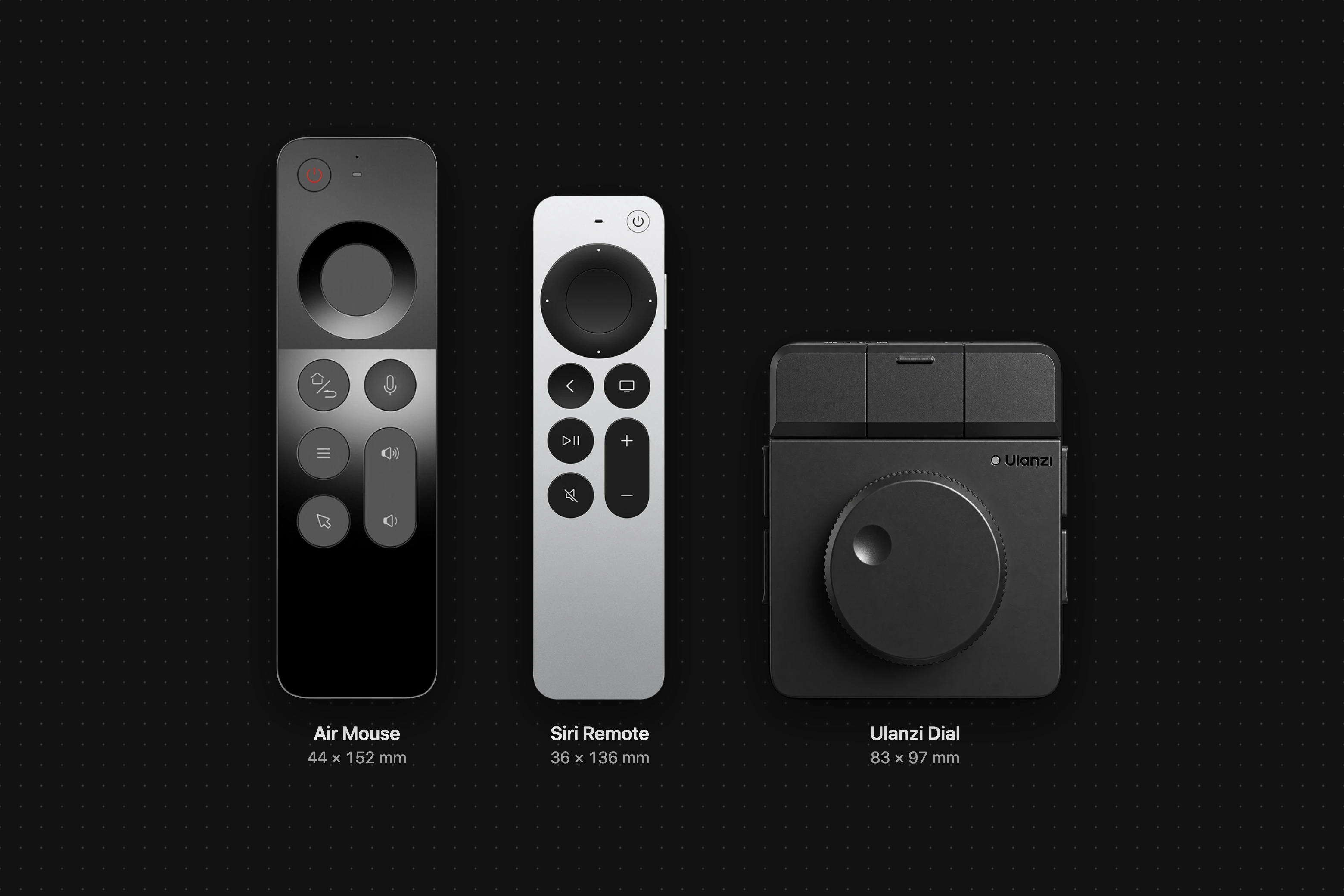
The remotes at their measured sizes, from the makers’ photos.
The Dial went the same way. Its vendor app had lost my trust, and I put it plainly: “The Ulanzi Dial is basically a remote. We already have a remote abstraction.” The agent decoded the Dial’s own Bluetooth protocol, and five minutes after I quit the vendor app: “everything works”. One position of its hardware switch now talks to the Linux machine and dims the chandelier while the MacBook sleeps. “One remote” stopped meaning one remote for the Mac and started meaning one remote for the room.
Movie night belongs to Home Assistant
The feature I use most is a single Launcher item: Projector. My projector is about as smart as a brick. It only listens to infrared, and the only sign that it’s on is that it slowly appears on the network. So the scene sends Power, waits 27 seconds, presses Right four times 600 ms apart and then OK to reach the HDMI input. It switches the audio processor’s preset, moves the remotes to the Google TV Streamer and turns the Mac’s displays off last.
Each of those numbers came from a failure. Sent 100 ms apart, four Rights read as one held key that auto-repeated five steps. The projector ignores pings for four seconds or more about once a minute, so it can’t be asked whether it’s on. And a touch on the trackpad woke the displays in the middle of the scene, so they now go off last.
The scene started inside Straylight, as a scenario that guessed the projector’s state. That evening I asked whether it wouldn’t be more rational in Home Assistant, which can see the projector on the network, and it moved the same day. That set the line between the two: Home Assistant owns the household; Straylight owns the computers, and publishes what Home Assistant can’t see for itself.
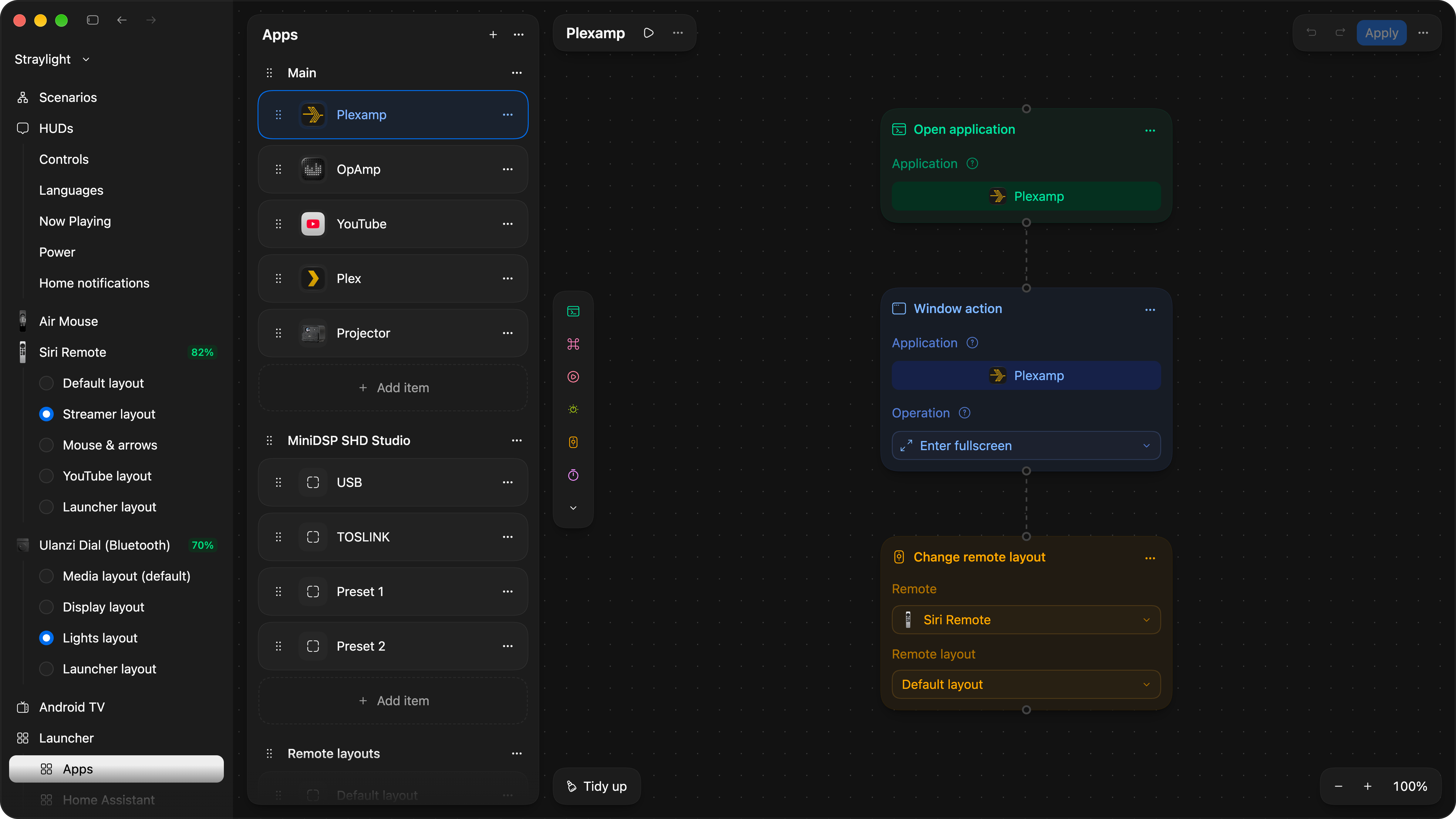
The Launcher’s Apps section. Every item is a scenario.
Field notesThe physical world argues back
- The monitor. My Dell loses brightness writes sent 10 ms apart, so they go at least 20 ms apart. A confirmed write takes about 150 ms, and 130 of those are the monitor’s own delay.
- The wrong player. A Play command addressed to Plex was accepted by macOS and delivered to Plexamp instead. Since then, a sent shortcut and confirmed playback count as different kinds of evidence.
- The swallowed press. The first Back in the menu disappeared: the capture helper waited for a “neutral” report that the Air Mouse never sends while idle.
- Silent clicks. Menu clicks went quiet during fast navigation, because the system sound player needed 123–242 ms to start. A running audio stream fixed it.
- The display that went dark. The audio processor’s “keep the display on” value held for three minutes in testing, and later the display turned off anyway. Straylight now resends a two-minute timeout every minute.
- A hidden pause. Home Assistant’s Android TV integration waits 0.4 s after every command unless told not to.
- Low Power Mode. I turned it on to quiet the fans, and macOS capped the built-in display, so Dim’s 10% became almost black. “From a product point of view it would be right to adapt even to this, at the Straylight level.”
- The 435× knob. Turning faster makes the Dial take bigger steps. Two milliseconds of Bluetooth jitter between two clicks once read as a 435-fold acceleration, so the speed is now capped at 48 clicks a second.
Rust in a day, then a knob that felt slow
On 8 October I wrote down what the app is for:
The point of the app: turn your computer into a controllable device that Home Assistant can reach, in particular a media device, a media centre.
Any computer, not just my Mac. The agent’s research was careful: keep the engine in Swift, share a few small pieces in Rust and write a separate engine for Linux. Two days later I set a different destination: one engine for every platform, the Mac included. Rust was new to me, and learning what it’s good for was part of the point.
Before anything moved, hundreds of small capture programs recorded what the Swift code actually did, so each piece moved to Rust could be checked against it. Then, on 11 October, the core moved owner by owner: configuration, scenarios, the Dial, states, storage, HUDs, MQTT. That day has 457 commits, and the Rust code went from 822 lines to 70,935. Workers ran on GPT-6.1 Sol and GPT-6 Astra reviewed their code, because Sol “loves to overcomplicate things endlessly”. If the reviewer had nothing substantial to say, the instruction was “don’t burn tokens”.
The next day an audit gave the honest verdict: “language ownership is ahead of architectural separation”. The day after that, I felt it. I can’t read a profiler, but I can feel 100 ms in a volume knob, and it was “bloody obvious how much less responsive the volume control has become”. An audit measured why: since the Rust day, every press copied the whole 2.7 MB configuration into Rust, 219 ms of work for one HUD press. After the fix it took 4.
I keep noticing that Straylight’s responsiveness to key presses sort of floats. Maybe the critical things should move to some reserved thread. What class should we extract from this observation and intention of mine?
The class was the main thread doing everything; under the editor’s load it was stalled for more than 30 ms about 30% of the time. Since 18 October rules, HUD feedback and input each have their own thread, the main thread only draws, and a build check fails any new hop onto it.
MeasurementsBefore and after
- A HUD press, with my 2.6 MB configuration: 219 ms of work before, 4 ms after (13–14 October, a synthetic benchmark, 200 presses).
- Opening the Launcher: 158 ms before, 2.9 ms after (same benchmark).
- Saving the configuration: the main thread stalled for about 1.25 s before, at most about 45 ms after (18 October).
- A Dial turn into a Home Assistant script: 22.6 ms before, 9.5 ms after, with no new connection per click (19 October, against a simulated Home Assistant).
- The Launcher’s first spoken word: about a second before, 9.5 ms after (16 October, a fake audio output).
- Idle: half a CPU core spent listing voices, fixed on 14 October; another quarter of a core in polling loops, replaced by events on 20 October. Neither has a final figure yet, and the new threads haven’t been timed end to end since they landed.
Every computer is a Host
On the evening of 15 October I opened the Dial’s page and couldn’t understand what I was looking at. One of its layouts ran “through Straylight Link”, the helper VM, and I could edit the action on a button but not add a second one. “Why is there only one action on Link? What stops it running the same scenarios as on the Mac?” Nothing did: the limit was our own decision, and the Rust engine could run there too. Five minutes later I went further:
What if we take an even wider view and treat Straylight Link as just another host? There’s a host on macOS, there’s a host on Linux, and some interface manages them. Although here I start to drift; this is probably where concepts like a leading host appear.
GPT-6 Astra argued against the leading host, then grilled me with 23 numbered questions, each with a recommended answer. Between 20:40 and 21:55 I answered “1”, the recommendation, 21 times and “OK” twice. Now there is one Straylight running on several Hosts, each a named computer that owns its configuration and runs it with what it has. My MacBook is one; the Linux VM, named homelab, is another. They run the same Rust core, about 157,000 lines by 20 October, each with its own platform adapters.
When one Host needs another, it asks explicitly over an encrypted connection: run your scenario, read or set your State, use your Home Assistant. Sunday 19 October has 202 commits of exactly that: pairing with one-time codes, scenarios calling other Hosts, Scenes holding values from two computers. The old Link channel was deleted the same day. My answer to keeping it as a fallback: “Let’s do without these backup channels and other mush.”
- BluetoothSiri Remote
Presses, touches, the ring and the microphone
- Linux Hosthomelab
Captures the remote on its own adapter and picks one Mac
- Host connectionTLS, pinned key
Late presses are dropped; a release always arrives
- Mac Hostwintermute
Its layouts and scenarios run the press
The Dial can do the same, or run its own layouts on homelab while the Mac is off.
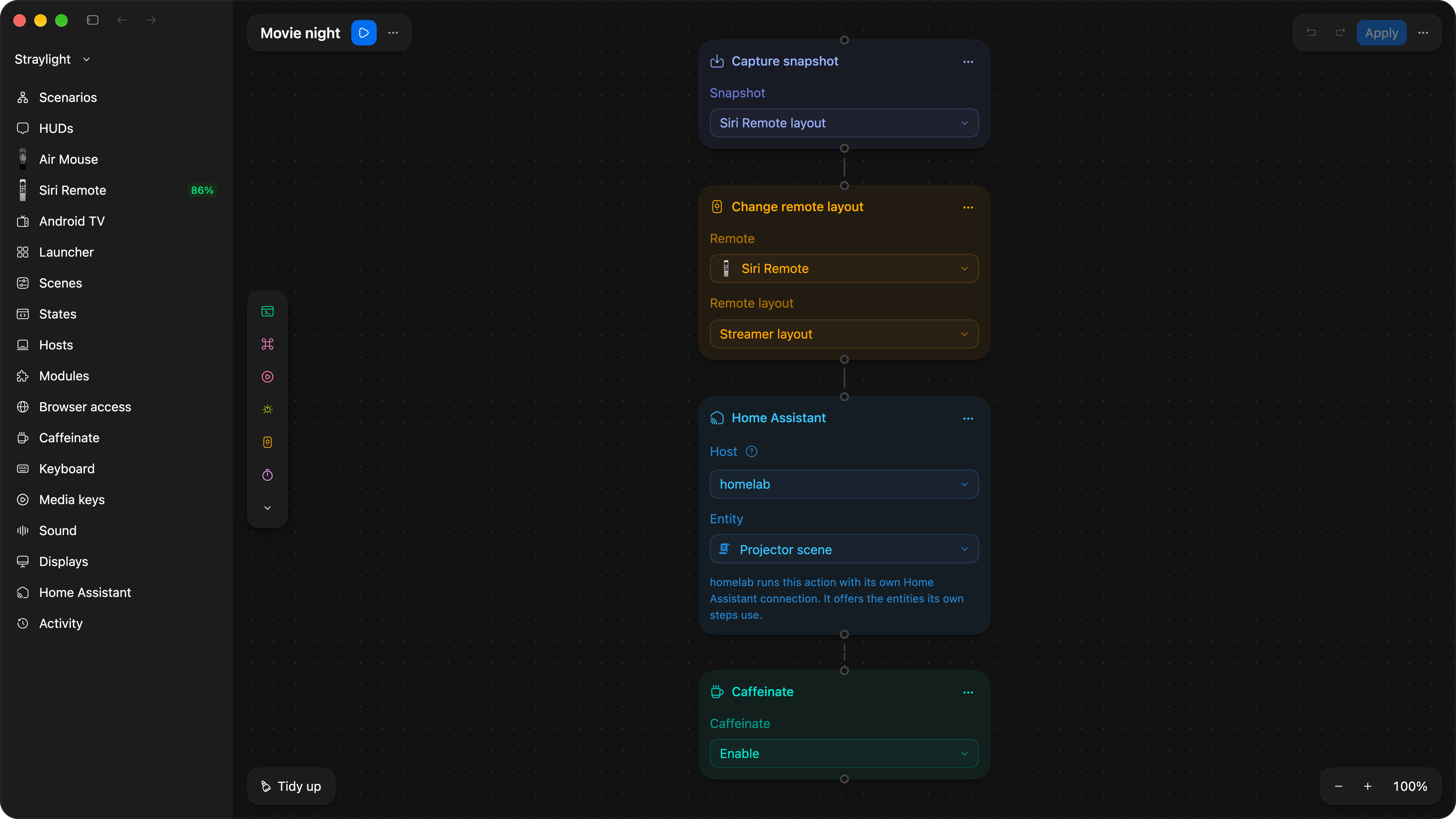
A demo scenario made for this page.
This is the pattern the whole project keeps repeating. A special case turns out to be an ordinary thing in disguise. The Dial was “basically a remote”. The Launcher layout became an ordinary layout. The Launcher’s items, the remote’s buttons and the Dial’s turns all became scenarios. And the helper VM became the same Straylight on a smaller computer. Each time, a rule disappears and something reusable takes its place.
Everything is a State
The other half of the model is State: what something is right now, and what it should become. It started on 24 September with the projector. To leave movie mode I’d have needed a separate “Exit Projector” item, “and that’s a crutch”. Within an hour the vocabulary was settled: a Scene is “like a preset”, and a custom state is for “a stateless device where we somehow need to pretend it has a state”.
The biggest change came on 18 October, out of the HUD. Its third tab was hard-coded for “the primary light”, and a second lamp had a role of its own:
If, say, I have both a chandelier and a lamp in the room that I want to control separately, I could get a fourth tab and adjust that extra lamp there. And it might not be a lamp but, say, the curtains. See where I’m going?
The tabs became views of States, up to eight, each added straight from a Home Assistant entity. An hour and a half later I asked whether the fast value I turn and the real value that follows were separate, “I thought that was the whole point”, and they became so: the Dial moves a target level that the HUD shows at once, and the device follows. From that conversation to working code took about nineteen hours; from my July remark that the HUDs “will essentially be states, tabs, of a single HUD”, eighty-one days.
The HUDs of 3.0.3. The track title is sample text.
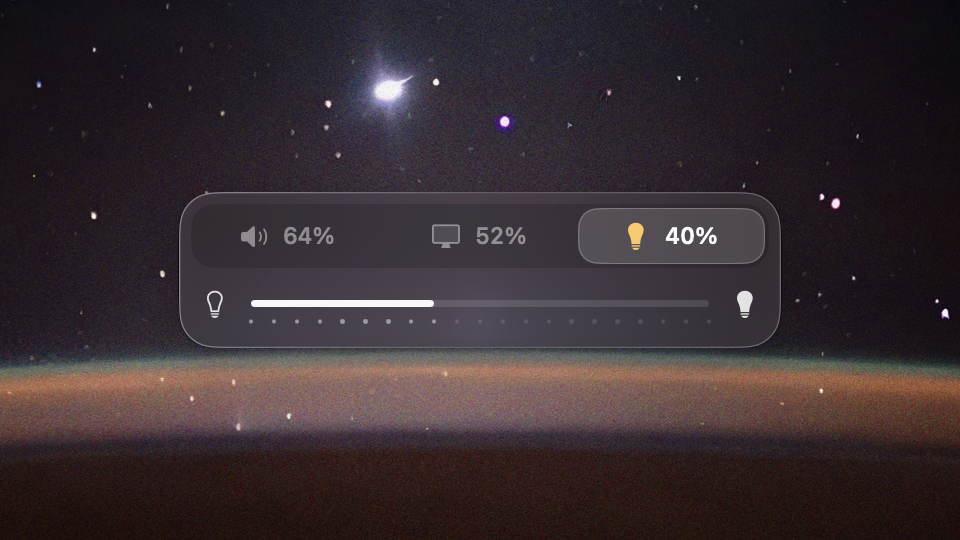
ControlsThree tabs over States, the chandelier selected.
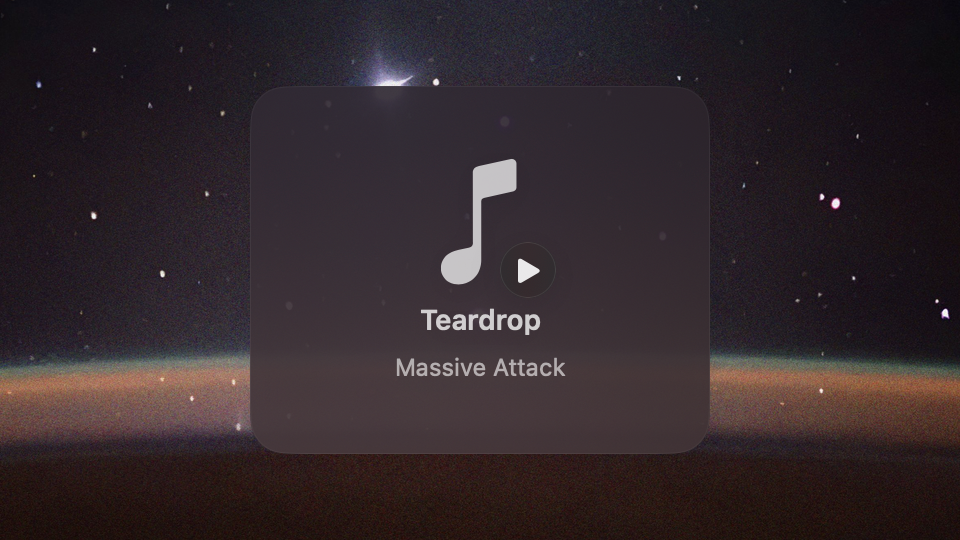
Now PlayingThe track that started, with a play badge.
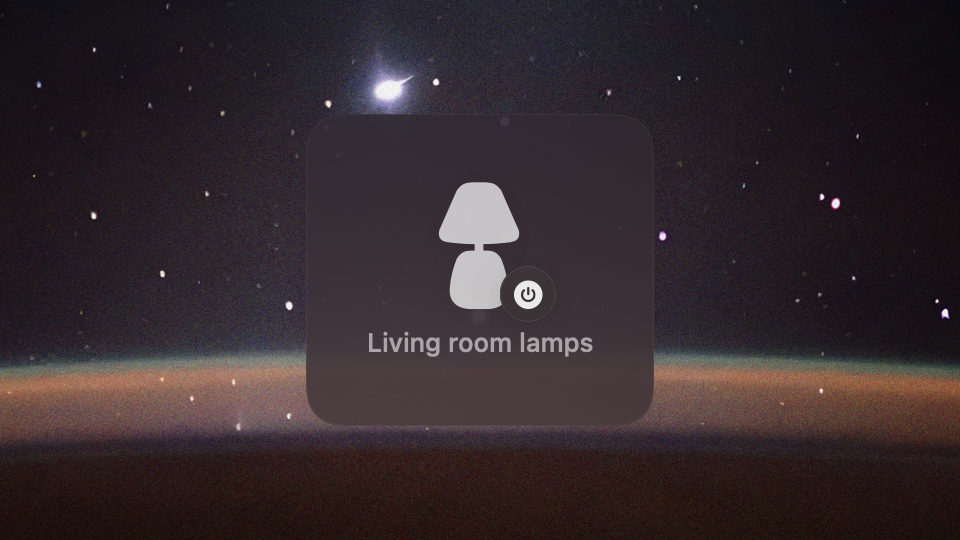
PowerA switch flipped by a button that has no tab.
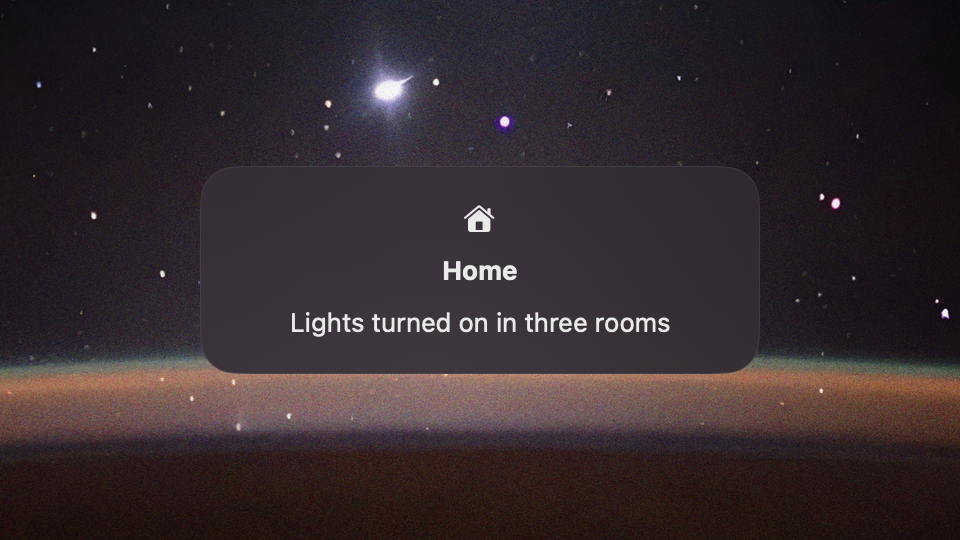
HomeA notification sent by Home Assistant.
The next day Home Assistant’s lights, covers, fans and media players became States too, kept current by one subscription per Host instead of a request on every read. On 20 October I asked to “redo this as a data grid… we split everything the way Home Assistant does: device, then state”, and the States page became one table on Data Grid.
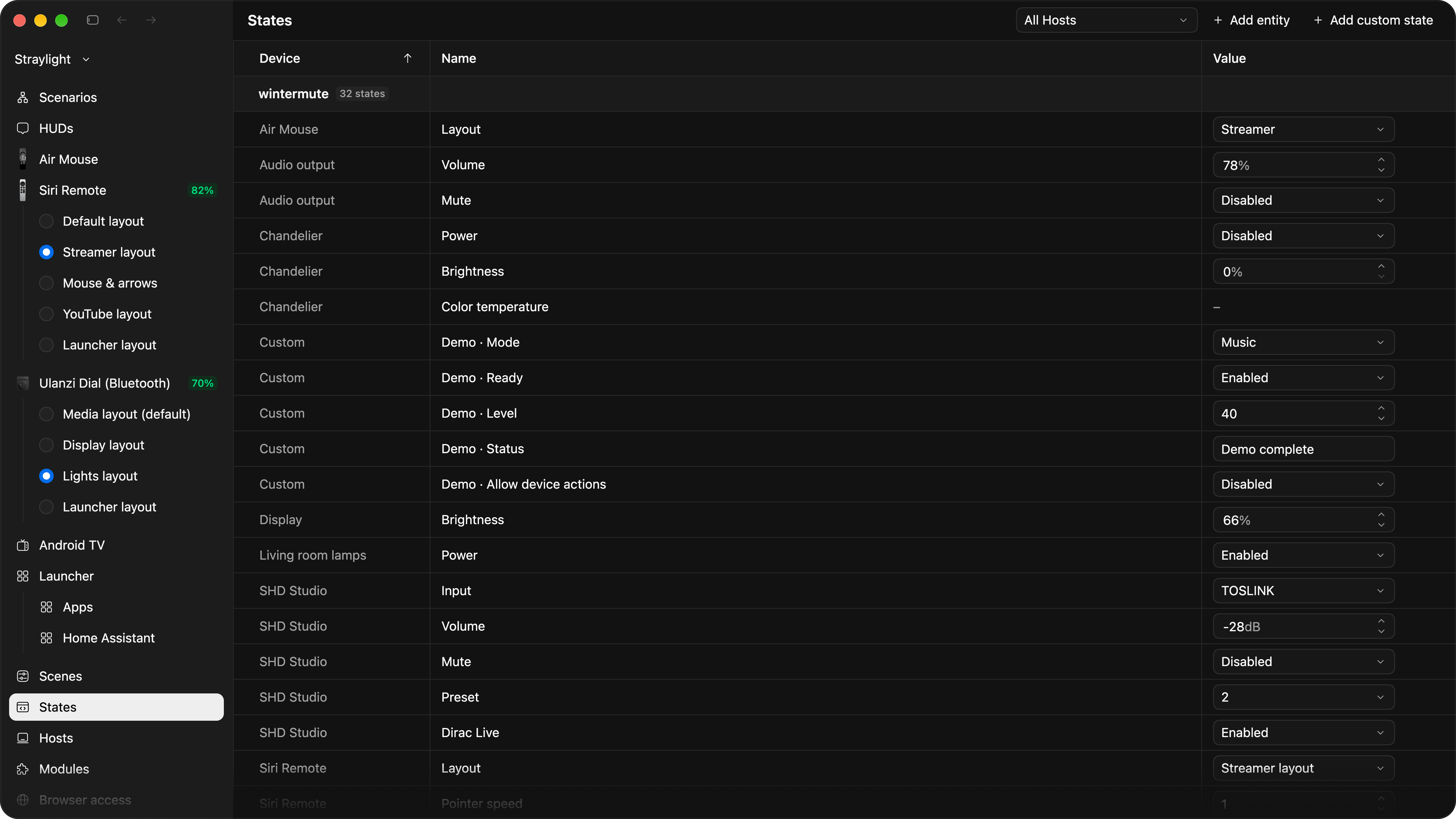
Every State of every Host in one table.
Built to be trusted
An app that captures input and controls a computer should be readable, and everything in it that asks for trust can be switched off. The idea came at a quarter to three one morning, when the Dial’s Link connection annoyed me by sitting in the device list. Twenty minutes later I saw the real reason for it:
I’m also thinking about these modules in terms of people not being afraid to use the app, knowing they can switch a module off. When an app asks for the Accessibility permission, that’s serious business. And so that in the open-source code you can see that the module really cuts that functionality off completely.
A module that’s switched off stops taking work, cancels its timers and ignores late callbacks. Today there are four: media keys, the Home Assistant bridge, the connection to the Linux Host and an MCP server for AI agents. The design document is honest about the limit: switching a module off stops it, but doesn’t narrow the system permissions the app already has.
The MCP module came from a question on 14 October: “Someone downloads Straylight, installs it, and these days it’s just not the done thing to walk around setting up a scenario by hand. So they should ask an agent what they can do.” It’s off by default. Claude Code, Codex or Cursor can read the configuration and propose changes, shown on the canvas as drafts marked with the client’s name. An agent can’t see credentials, pair devices or delete anything, and it can apply only its own drafts, with my consent.
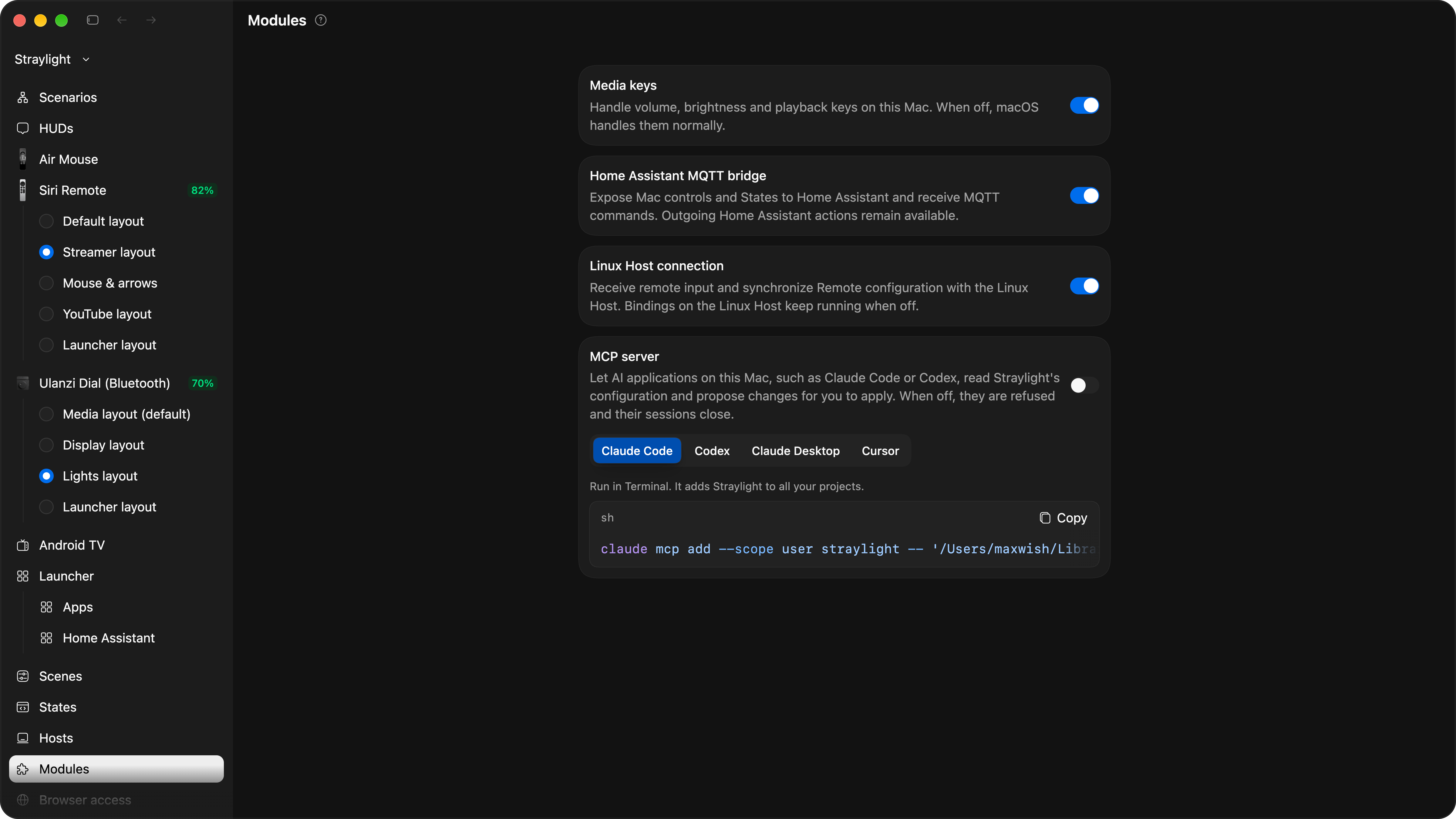
The four built-in modules in 3.0.3.
Under the hoodSecurity, in the order it happened
- 25 September. The unauthenticated local HTTP API, 52 endpoints, shrinks to two Dial routes; on 6 October it’s gone.
- 1 October. Secrets move out of the Keychain, which refused every rebuild of a self-signed app, into owner-only files. The decision record says plainly that any process running as me can read them.
- 5 October. Remote input leaves the MQTT broker for its own channel: keys derived per session, every packet sealed with ChaCha20-Poly1305 and counted, so a replayed one is dropped.
- 16 October. Each of the 77 commands a browser or an app can send declares its access level: view, control or administration. By 19 October there are 102.
- 17–19 October. Hosts and browsers connect over TLS 1.3 and pair with one-time codes through SPAKE2, bound to the TLS session so a relay in the middle fails. Clients pin the Host’s key rather than its certificate. Plain HTTP is served only on the Mac itself, and even a local browser has to sign in.
- Locked Mac. While the screen is locked, keyboard, window and pointer actions are refused, and nothing refused runs after unlocking.
- Review. A Codex review of 494 commits from 15–18 October found four defects, among them a revoked browser that could finish a delayed upgrade. All four were fixed on 18 October.
Working with agents
I never look at the code. I can only skim very high-level architectural decisions and find logical inconsistencies in them.
Most of my more than 2,000 messages to the agents are short: commit, push, merge, “pressed it, works”. The rest are long dictated monologues about the model, which I asked the agents not to take literally: “It’s my stream of consciousness. Pick the optimal solution.” Around that, a working loop grew:
- Grill. Before a big piece of work, the agent interviews me with numbered questions, each with a recommended answer.
- Tickets. Decisions go into GitHub issues: 403 of them by 20 October, and not one pull request.
- Lanes. An orchestrating agent runs tickets in parallel, each worker in its own copy of the repository.
- Review. Two independent reviews, one against the project’s standards and one against the spec, before anything reaches the main branch.
- Release notes. One file per day, written for a user, shown in the app under What’s new.
Codex and Claude checked each other’s work. On 6 October Claude ran out of its usage limit with about 25 parallel lanes in flight, and Codex merged its branches, including 19 files a worker hadn’t committed. At six the next morning:
Let’s not rely on your memory for orchestration. Maybe we need a skill, “orchestrate”, that describes what the orchestrator needs.
The skill appeared that morning, with a budget of four parallel lanes and a procedure for recovering from a usage-limit stop. That’s the habit I’m proudest of: fixing the class of a mistake rather than the instance. When an agent took several tries to build a dialog properly, I asked it why, and what minimal steps would make it work for other agents. The answer usually became a lint rule, a skill or a better name.
I also kept the app free of legacy. Names had drifted as fast as the code: “Home” meant Home Assistant, a Dial position and the Linux VM, and an audit of 111 glossary terms found real bugs hiding in the words. The audit advised keeping old formats readable. I disagreed: “While the app isn’t public, this shouldn’t multiply at all.” The decision went into the repository as one sentence, “The application is not public.” My configuration was converted once and the old readers were deleted. In 2,583 commits there isn’t a single revert commit: the direction changed constantly, but always forward.
Plenty of dead ends were mine: navigating the Launcher by keyboard colours, an editor without a save button, a single shared memory of State I defended for two weeks, and the projector logic in the wrong place.
Where it stands
Version 3.0.3 runs every day on my Mac and on homelab. What’s still open: my own acceptance of the first two-Host milestone on real hardware, the full core on Linux, smaller Hosts such as a Raspberry Pi, and voice from the Siri Remote’s microphone. Windows isn’t started. Straylight is built around one home, my devices and my habits, and several numbers on this page are single runs or synthetic benchmarks, as their notes say.
It’s still a personal tool and a favourite toy, but it’s built to a standard where opening it makes sense, and I probably will: “So people can see this thing isn’t malware, that it doesn’t steal data, doesn’t intercept input and send it off somewhere.”
- The prototype, Wintermute Control.
A HUD like BetterDisplay’s for a new volume knob, and my own keyboard firmware that shows the input language. Then it sits untouched for six weeks.
- Back to it.
Straylight’s month starts here, with a newer model reviewing the July code.
- From a utility to a media centre.
An old Air Mouse, a Launcher, Electron and a flow editor built on my design system.
- One night, 175 commits.
A 4,697-line file is taken apart into modules. Claude suggests a new name.
- The Siri Remote.
It pairs with a Linux VM on my home server, because macOS won’t share its clickpad.
- Rust in a day.
457 commits move the engine out of Swift, owner by owner.
- One core, many hosts.
The Linux VM stops being a helper and becomes a Straylight of its own.
- 202 commits.
Hosts pair, borrow each other’s States and Home Assistant, and edit each other.
- Version 3.0.3.
The Linux Host gets its own Launcher, browser editing and the Dial’s dimmer.
- 5 weeksfrom 14 September to 20 October, after a five-day prototype in July
- 2,000+messages from me to the agents, the prototype included
- 2,552commits since 14 September, and no revert commits
- 403issues, and no pull requests
- 224klines of source, plus 139k lines of tests
Claude Opus 5.5 co-signed 1,055 of the commits, about half of them in the last six days. Most of the rest, including the whole Rust day, came from Codex sessions on GPT-5.6 Sol, GPT-6 Astra and GPT-6.1 Sol.
One intent away
Writing my own tools with agents had stopped surprising me. What I didn’t expect was hardware. A device I like no longer comes bound to the software it shipped with, or to the limits of the system it plugs into.
You can’t use the Siri Remote properly on macOS? Now that’s not a problem: you take it and use it. You don’t like Ulanzi Studio? Write your own software. You want a smart home where you don’t spend months reading forums to fix something? Tell the agent; it knows Home Assistant very well. Home Assistant is missing some capability? You just get it, and connect any hardware to whatever you need.
Every one of those happened this month. The real distance now is whether I can hold the big picture. At school, with a receiver soldered to a COM port, I could read every button on my remote, and what stood between me and the rest was everything I couldn’t build. Now it’s mostly how clearly I can say what I mean.